Keyboard and mouse test
Press any key. Keys turn green once they register.
Tap a suspect key slowly, about 40 times, one deliberate press at a time. A human cannot release and press the same key this fast, so anything flagged here is the switch bouncing.
- No chatter found yet.
Held now
0
Most at once
0
Hold keys down together and keep adding more. W, A, S, D, Shift and Space is a realistic start.
- Left0
- Middle0
- Right0
- Back0
- Forward0
Click, right-click, middle-click and scroll inside this box.
Keys with a dashed outline, media keys and brightness keys are handled before the browser sees them, so they cannot light here. Nothing is stored or sent. Even so, never type a password into a keyboard tester.
Laptop keyboard test: find the keys that stopped working
Press each key and watch the layout. On a laptop the useful question is not whether a key is broken but whether the fault is a crumb, a driver or the ribbon cable — and the pattern of dead keys usually tells you which.
Best keyboard for a laptop with dead keys
Affiliate links
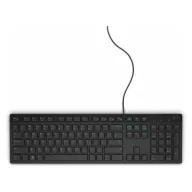
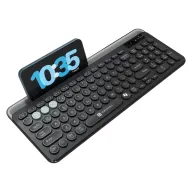
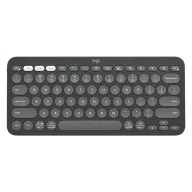
When laptop keys die or type twice, an external keyboard is the quickest fix and costs less than most keyboard repairs. The wired Dell KB216 is the cheapest dependable choice, the Portronics Bubble 3.0 adds wireless and a number pad, and the Logitech Pebble Keys 2 K380s is the slim one to carry with the laptop.
Budget · Under ₹700
Dell KB216 wired keyboard
The cheapest dependable fix: plug it in and type. Full size, with a number pad and media keys.
See it on Amazon IndiaMid-range · Under ₹1,000
Portronics Bubble 3.0 wireless keyboard
Wireless with a number pad, rechargeable, and able to switch between three devices.
See it on Amazon IndiaBest to carry · Under ₹3,500
Logitech Pebble Keys 2 K380s
Slim enough to carry in the laptop bag, and it pairs with three devices at once.
See it on Amazon India
Picked from Amazon.in best sellers rated 4 stars or more. Spolvero may earn a commission.
The short answer
To test a laptop keyboard, press every key and watch the on-screen layout. A single dead key is usually debris under the cap. A dead row or a dead block points at the ribbon connector or the controller, which is a repair rather than a clean. Keys that work here but not in one program are a software problem.
Four things worth knowing
Read the pattern, not the key
One dead key is mechanical. A whole row, or a contiguous block failing together, is the matrix or the ribbon cable, and no amount of cleaning will change it.
Plug in a USB keyboard to split the problem
If an external keyboard works perfectly, the operating system and drivers are fine and the fault is in the built-in keyboard. That single test removes most of the guesswork.
Compressed air at an angle, machine on its side
Blowing straight down pushes debris further in. Tilt the laptop and aim across the key so the crumb leaves the way it arrived.
Mention any spill before paying for a diagnosis
Liquid damage shows as keys that work intermittently, or a keyboard that starts repeating. Even a small spill changes the repair path completely, so say so up front.
Nothing leaves your device
This test runs entirely in your browser. There is no upload, no recording and no server that could receive anything — close the tab and it is gone.
- No sign-up and no account
- Nothing recorded or stored
- Works with an ad blocker on
- Free, and staying free
Questions people ask
Anything we've missed?
Is it worth replacing a laptop keyboard?
It depends on the machine. On many laptops it is a serviceable part at modest cost; on thin ultrabooks the keyboard is bonded to the top case and the repair approaches the value of the laptop. Check your model before deciding.
My laptop keyboard works in BIOS but not in Windows.
That isolates it to software — the hardware is fine. Remove the keyboard device in Device Manager and reboot so Windows re-detects it, and check for a filter driver from a vendor utility.
Only the number keys stopped working.
Check Num Lock, and on a compact laptop check whether the embedded numeric keypad has been switched on over the letter keys. This is a mode rather than a fault more often than people expect.
Can I keep using a laptop with one dead key?
Yes, with a remap. Windows PowerToys and macOS Karabiner both move a function to another key, which is a reasonable stopgap while you decide about a repair.
Test it for something specific
Other device tests
- Live
Webcam Test
Check your camera in 3 seconds.
- Live
Online Mirror
A mirror with light, zoom and Ghost Pose.
- Live
Voice Recorder
Record, trim, download. Nothing uploaded.
- Live
Teleprompter
Read your script while you record.
- Live
Bingo Card Generator
Unique cards in a minute. Call it on screen.
- Live
Tambola Tickets
Proper 3×9 tickets, and a 1–90 caller.
- Live
Tambola Prize Calculator
Every dividend in rupees, adding up exactly.
- Live
Kitty Party Chits
Print folded chits, or draw one on screen.
- Live
Virtual Piano
Play, learn a song, record it.
- Live
Photo Jigsaw Puzzle
Any photo, 12 to 300 pieces.
- Live
Poster Maker
Any picture, wall-sized, on A4 or Letter.
- Live
Chart Maker
Any photo as a chart you can stitch.
- Live
Row Counter
Never lose your row again.
- Live
Photo Metadata Remover
See what your photos give away, then remove it.
- Live
Change Photo Date
Fix a wrong camera clock for a whole trip.
- Live
GST Calculator
Add or remove GST, with the CGST and SGST split.
- Live
Speech Time Calculator
How long your speech runs, or how many words to write.
- Live
Exam Time Calculator
Minutes per mark, and a finish-by time for each section.
- Live
Ring Sizer
Lay a ring on the screen, read five size systems.
- Live
Bangle Sizer
Lay a bangle on the screen, or measure your hand.
- Live
Online Ruler
A real-size ruler, once you match a card.
- Live
Mic Test
Hear yourself before they do.
- Live
Speaker Test
Left, right, and is it loud enough?
- Live
Mouse Test
Catch the double-click fault before you blame the software.
- Live
Dead Pixel Test
Check a new screen before the return window closes.
- Live
Laptop Check
Nine checks, fifteen minutes, one printed record.
- Live
Kundli Maker
Lagna, grahas, nakshatra and dasha.
- Live
Birth Chart Calculator
Sun, Moon and rising sign, with the wheel.
- Live
Today's Horoscope
Read from where the Moon is right now.
- Live
Today's Panchang
Your city's tithi, nakshatra and sunrise.

Find the problem now, not mid-sentence
Every one of these runs in the browser and checks one thing properly. Nothing is uploaded, nothing is recorded, and none of them need an account.
Guides worth reading
- Keyboard
Keyboard ghosting test: what ghosting and n-key rollover mean, and how to check yours
Why some key combinations drop a press, what 2KRO, 6KRO and NKRO mean, how many keys you actually need at once, and how to test your keyboard in a browser.
6 min read - Keyboard
Keyboard keys not working or typing twice: how to find out why
A dead key, a key that types twice and a key that repeats on its own are three different faults. How to tell them apart in two minutes, and what fixes each one.
6 min read
