Best keyboard for a laptop with dead keys
When laptop keys die or type twice, an external keyboard is the quickest fix and costs less than most keyboard repairs. The wired Dell KB216 is the cheapest dependable choice, the Portronics Bubble 3.0 adds wireless and a number pad, and the Logitech Pebble Keys 2 K380s is the slim one to carry with the laptop.
Test yours firstRun the free Keyboard Test: it may be a setting, not the deviceThe picks at a glance
Budget · Under ₹700
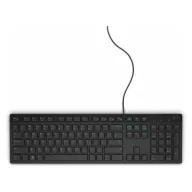
Dell KB216 wired keyboard
The cheapest dependable fix: plug it in and type. Full size, with a number pad and media keys.
See it on Amazon IndiaMid-range · Under ₹1,000
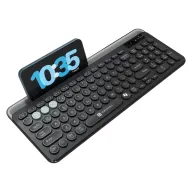
Portronics Bubble 3.0 wireless keyboard
Wireless with a number pad, rechargeable, and able to switch between three devices.
See it on Amazon IndiaBest to carry · Under ₹3,500
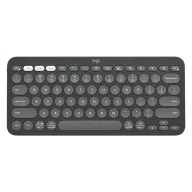
Logitech Pebble Keys 2 K380s
Slim enough to carry in the laptop bag, and it pairs with three devices at once.
See it on Amazon India
Find out which keys are failing first
Open the free Keyboard Test and press every key. Keys that never light up are dead; a key the test catches typing twice is chattering. A single dead key is often dirt under the keycap, and compressed air or a careful clean can bring it back. Several dead keys in one row usually point to the keyboard's ribbon cable or a spill, which is a repair job.
If cleaning does not help, an external keyboard gets you working again today, and it keeps working even if the laptop keyboard gets worse.
Wired or wireless
A wired USB keyboard needs no batteries, no pairing and no driver, and works the moment it is plugged in, even in the BIOS. A wireless keyboard frees a USB port and the desk, and the ones below can switch between the laptop, a phone and a tablet. If your laptop has only USB-C ports, a wired USB-A keyboard needs an adapter; a Bluetooth keyboard does not.
Make the laptop comfortable to use with it
With an external keyboard, put the laptop on a stand or a stack of books so the screen is at eye level. You no longer type on the laptop, so there is no reason to look down at it. If a stuck laptop key keeps typing on its own, it will still do so with an external keyboard attached; that one needs the key cleaned or the laptop keyboard disconnected by a technician.
The three picks in detail
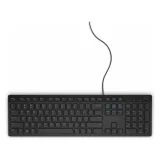
Image: Dell Budget · Under ₹700
Dell KB216 wired keyboard
The cheapest dependable fix: plug it in and type. Full size, with a number pad and media keys.
- Wired USB, plug and play with no lag. (Amazon.in listing)
- Full-size 104-key layout with chiclet keys and multimedia hot keys. (Amazon.in listing)
- Listed as spill resistant, with three indicator lights. (Amazon.in listing)
- Works with Windows, Linux, ChromeOS and Android. (Amazon.in listing)
Watch out: Full size and wired, so it takes desk space and a USB-A port; USB-C-only laptops need an adapter.
See it on Amazon India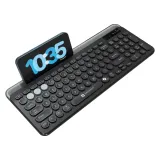
Image: Portronics Mid-range · Under ₹1,000
Portronics Bubble 3.0 wireless keyboard
Wireless with a number pad, rechargeable, and able to switch between three devices.
- Bluetooth 5.3 and a 2.4 GHz USB receiver; switches between 3 devices. (Amazon.in listing)
- Rechargeable battery, charged over USB Type-C. (Amazon.in listing)
- Full layout with a number pad and multimedia keys. (Amazon.in listing)
- Works with Windows, iOS, Android and smart TVs; 1-year warranty. (Amazon.in listing)
Watch out: Membrane keys, so typing feel is softer than a laptop's scissor keys. Needs charging now and then.
See it on Amazon India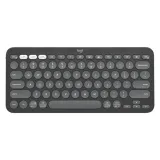
Image: Logitech Best to carry · Under ₹3,500
Logitech Pebble Keys 2 K380s
Slim enough to carry in the laptop bag, and it pairs with three devices at once.
- Bluetooth, connects up to 3 devices and switches with Easy-Switch keys. (Amazon.in listing)
- Works with Windows, macOS, iPadOS and ChromeOS. (Amazon.in listing)
- Maker lists a battery life of up to 3 years, batteries included. (Amazon.in listing)
- 10 Fn keys can be customised in the Logi Options+ app. (Amazon.in listing)
Watch out: Compact, with no number pad, and Bluetooth only: there is no USB receiver for a laptop without Bluetooth.
See it on Amazon India
How these were picked
These are not hands-on reviews. The picks come from Amazon.in best sellers rated 4 stars or more by buyers, compared on the specifications their makers publish; each fact says where it was read, on 6 October 2026. The price bands were right that day, and Amazon prices change daily, so check the listing before you buy. Product photos come from each maker's own website and belong to the maker. The freeKeyboard Test on this site is the hands-on part: run it on what you have now, and again on what you buy.
Spolvero may earn a commission from the links above. None of it changes what the tests measure or which products are listed.
Can I use an external keyboard if some laptop keys are dead?
Yes. A USB or Bluetooth keyboard works alongside the laptop keyboard; the dead keys simply go unused. The exception is a key stuck down and typing on its own: that keeps happening until the key is cleaned or the laptop keyboard is disconnected.
Is it cheaper to replace the laptop keyboard?
A keyboard replacement means a part and labour, and on many laptops the keyboard is fixed to the top case. An external keyboard costs less than most repairs and works today; repair it later if you want the laptop portable again.
How do I know if a key is dead or just dirty?
Run the Keyboard Test. A key that never registers may be dirty or dead; clean it and test again. A key that registers twice from one press is chattering, which cleaning sometimes fixes too.
Wired or wireless keyboard for a laptop?
Wired if you want no batteries and no pairing; wireless if you want a free USB port and to switch between devices. Both work the same for typing.
Prices and specs checked 6 October 2026.