Timer
Started
—
Finishes
—
5:00
No ads in fullscreen
My times
- Nothing saved yet. Saved times stay on this device — no account, nothing uploaded.
An audio file up to 1 MB. It stays in this browser and appears as "My sound" in the Sound list.
- Space
- Start or pause
- F
- Fullscreen
- Esc
- Leave fullscreen
- R
- Reset
- ↑
- Add a minute
- ↓
- Take off a minute
- M
- Mute or unmute
Read next: How long should classroom activities actually take?All 8 timers
Classroom timer: big, calm, and ad-free on screen
Pick a time, press start, go fullscreen. Students can read it from the back of the room, and nothing else appears on screen.
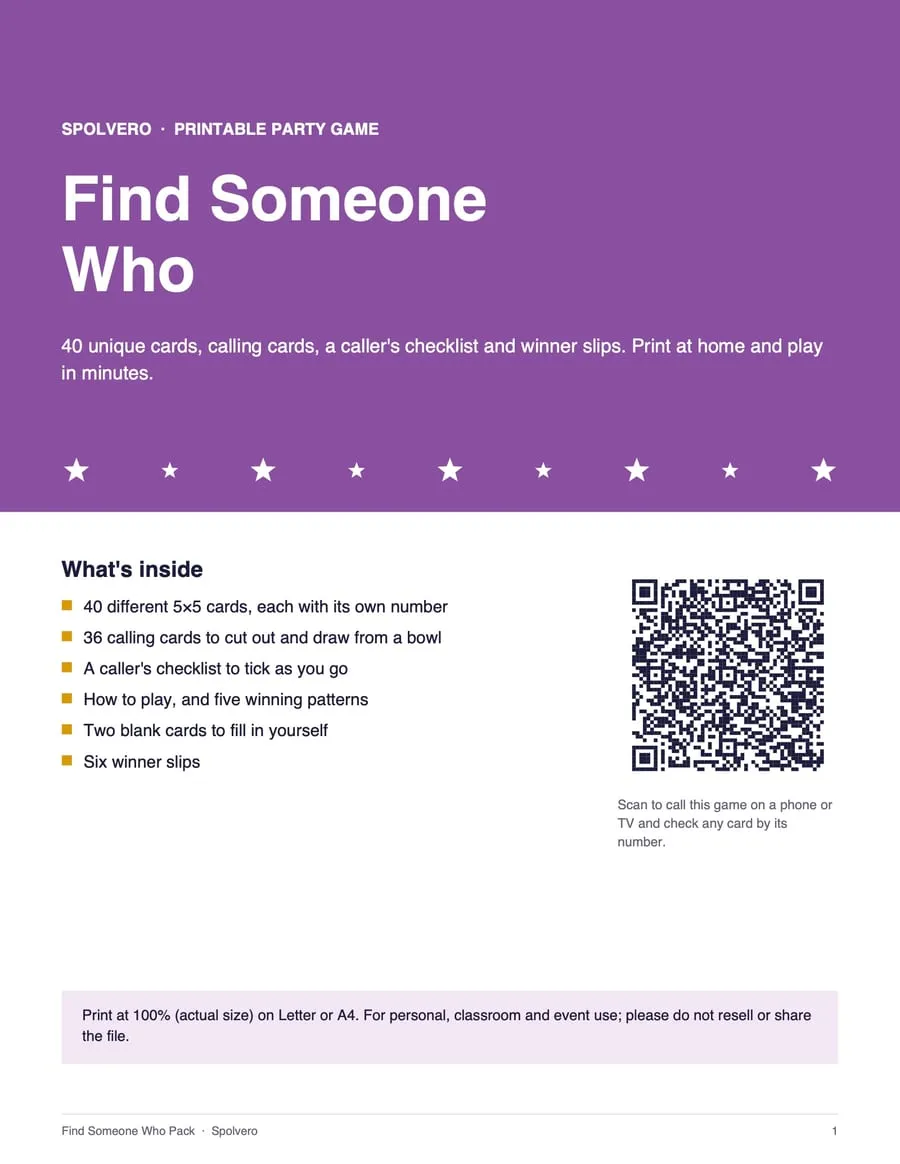
Sight Word Bingo pack
For the game after the timer goes off: made with our free Bingo Card Generator, this pack is ready for a class. Print it, cut it, play.
- 40 different 5×5 cards, each with its own number
- 48 calling cards to cut out and draw from a bowl
- A caller's checklist to tick as you go
- How to play, with five winning patterns
- Two blank cards and six winner slips
- A QR code that turns any phone or TV into the caller
$3.99
One payment · instant download · US Letter and A4 PDFs
Secure checkout by Gumroad, without leaving this page. Buying a pack is what keeps the free tools free.Every detail of this pack
More class packs
The short answer
To run a timer on a smartboard, choose a preset below, press Start, then press F for fullscreen. The countdown fills the screen, turns amber at 20% remaining and red at zero, and plays a soft chime. Fullscreen shows no ads and no navigation, so the class only sees the time.
Three steps to a timer on the wall
Step 1: Choose a time
Pick a preset or set your own. The timer remembers what you used last on this device.
Step 2: Press start
Start the timer, then press F or the fullscreen button to fill the screen.
Step 3: Run the room
Space pauses, the up arrow adds a minute, R resets. Fullscreen shows the timer alone, with no ads and no navigation.
Four things worth knowing
Press F for fullscreen before the lesson starts
Fullscreen hides the browser, the navigation and every ad, so the board shows only the countdown. Escape exits. Doing it before students arrive avoids showing them a page of anything else.
The screen will not sleep
While a timer runs, the page asks the browser to keep the display awake, so a long silent-reading timer will not be interrupted by a screensaver or the projector dropping out.
Keyboard, not mouse
Space starts and pauses, F goes fullscreen, R resets and the up arrow adds a minute. If your board has a wireless keyboard or clicker, you can run the whole thing from anywhere in the room.
Set the tone with the sound
The default is a soft chime rather than an alarm, because a siren in a quiet classroom startles people. Switch to the loud bell for noisy rooms, or turn sound off entirely and rely on the colour change.
Timings that work in a real lesson
Common activity lengths, as a starting point rather than a rule. Adjust for your year group.
| Activity | Typical | Worth knowing |
|---|---|---|
| Do-now / bell work | 3–5 min | Short enough that late arrivals still catch it |
| Think-pair-share | 1 + 2 + 3 min | Think alone, then pairs, then share out |
| Group discussion | 8–12 min | Past 12 minutes most groups drift |
| Independent writing | 10–20 min | Scale with year group |
| Silent reading | 15–30 min | Build up over the term |
| Practical set-up | 5 min | A visible timer cuts this sharply |
| Tidy-up | 3–5 min | Give a one-minute warning |
| Exit ticket | 3–5 min | Keep it short or it eats the lesson |

No ads on your big screen
Ads pay for this page, and they stay on this page. The moment the timer goes fullscreen there is nothing on screen but the time — no banners, no navigation, no surprises in front of a room.
- Fullscreen shows the timer alone
- Ad sounds can never clash with the alarm
- Saved times stay on your device — no account
- Works with an ad blocker, and offline once loaded
Questions people ask
Anything we've missed?
Will ads show on the projector?
No. Fullscreen shows the timer and nothing else — no ads, no navigation, no branding beyond the timer itself. Ads appear only on this setup page, which is the part students never see.
Does it keep accurate time if I switch tabs?
Yes. The timer works from clock timestamps rather than counting frames, so switching to your slides or another tab does not make it drift. Browsers throttle background tabs heavily, which is what causes other timers to fall behind.
Does it work without internet?
Once the page has loaded, the timer runs entirely in your browser and needs no connection. If your classroom internet is unreliable, load the page before the lesson and it will keep working.
Can I save the times I use every lesson?
Yes. Save a time and it stays on that device, with no account and nothing sent anywhere. It is stored in your browser, so it is per-device and per-browser.
How big are the digits?
In fullscreen the digits scale to roughly a fifth of the screen height, which is legible from the back of a standard classroom on a normal smartboard. The ring around them gives students a sense of time passing without reading numbers.
What happens when the time runs out?
The screen turns red, flashes gently, and plays your chosen sound. The alarm stops on its own after a few seconds, or you can stop it with a tap or the space bar. There is also a one-tap add-a-minute if a class needs longer.
Time something specific
Guides worth reading
- Teaching
How long should classroom activities actually take?
Realistic durations for think-pair-share, group work, silent reading and tidy-up, and why a visible timer changes behaviour more than saying the time aloud.
6 min read - Teaching
How long should a brain break be? Timings, ideas and how to end one
Two to five minutes is the working range for a classroom brain break. How often to run one, what to do in it, and how a visible timer brings the class back.
6 min read


Other timers
- Live
Countdown Timer
Any time you like, rung on time.
- Live
Pomodoro Timer
Twenty-five on, five off, four times.
- Live
Speech Timer
Green, amber, red — the way clubs do it.
- Live
Exam Clock
Start time, finish time, time remaining.
- Live
Interval Timer
Work, rest, repeat — on the gym TV.
- Live
Tabata Timer
Eight rounds, twenty on, ten off.
- Live
Debate Timer
British Parliamentary, Worlds, LD.
Built by Spolvero studio. We design apps and websites for other people too.
Need an app designed?