Webcam test
Your camera preview appears here
Nothing is recorded and nothing is uploaded. The video stays in this browser tab.
Free · No sign-up
Webcam test
One tap, one browser prompt, and you get a score with anything worth fixing.
- Works on Chrome, Safari, Firefox and Edge
- Front and rear cameras on phones
- Revoke access any time from the address bar
Readiness score
Measuring…
- Camera workingChecking…
Whether the browser can open your camera at all.
- ResolutionChecking…
The size of the picture your camera is sending right now.
- Frame rateChecking…
Frames per second, measured from the live stream.
- LightingChecking…
How bright and how even the light on your face is.
Technical details
Nothing is uploaded or recorded — the video stays in this tab.How this works
Test the camera on your iPhone
The iPhone Camera app tells you nothing about what a browser or a video call will actually get. This test uses the same camera path a web call does, and lets you switch between the front and rear camera.
Best webcam under ₹3,000
Affiliate links
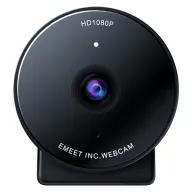
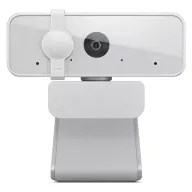
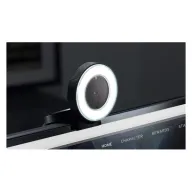
Under ₹3,000, the Lenovo 300 FHD is the best all-round 1080p webcam for calls, with a wide 95° lens and two mics. The eMeet C950 costs less and keeps the frame tight on you, and the Razer Kiyo is the one to buy for a dark room because it has its own ring light.
Budget · Under ₹2,000
eMeet C950 1080p webcam
The least you need to spend for 1080p, with a privacy cover and a tight frame that shows you rather than the room.
See it on Amazon IndiaMid-range · Under ₹2,500
Lenovo 300 FHD webcam
The all-rounder: a wide lens, two mics, a long cable and a tripod thread, from a laptop maker.
See it on Amazon IndiaBest for dark rooms · Under ₹3,000
Razer Kiyo webcam with ring light
A webcam and a light in one: the ring around the lens lights your face evenly, which is what a dark room needs most.
See it on Amazon India
Picked from Amazon.in best sellers rated 4 stars or more. Spolvero may earn a commission.
The short answer
Open this page in Safari on your iPhone and select Test my camera, then choose Allow. Use the camera picker to switch between the front and rear camera. If the prompt never appears, turn on Settings → Safari → Camera and set it to Ask or Allow.
Three steps, about three seconds
Step 1: Open the test
Open the Spolvero webcam test in the browser you use for calls.
Step 2: Allow the camera
Select Test my camera and choose Allow when the browser asks for camera access.
Step 3: Read the result
Your live preview appears with a readiness score, plus resolution, frame rate and lighting checks and a fix for anything marked amber or red.
Four things worth doing before you join
Hold the phone at eye level
A phone in your lap gives an up-the-nose angle no camera setting can fix. Prop it against something at eye height and step back until your head and shoulders fill the frame.
The rear camera is the better camera
If picture quality matters more than eye contact — recording a clip, or joining a call propped up — switch to the rear camera in the picker. It has a bigger sensor and better low-light behaviour.
Face the window, don't sit in front of it
Phone sensors are small and clip highlights fast. A window behind you turns your face into a silhouette that no amount of screen brightness will recover.
Low Power Mode can drop your frame rate
If the test reports an unexpectedly low frame rate, check whether Low Power Mode is on and whether the phone is warm — both make iOS throttle camera capture.
If the camera didn't start
Open the one that matches what the test told you — these are the steps for iPhone. If the test detected the problem, that section is already open.
The browser blocked the camera
On an iPhone the camera permission lives in the Settings app, separately for each browser, rather than anywhere on the page.
- 1For Safari: Settings → Safari → Camera, set to Ask or Allow. For Chrome: Settings → Chrome → Camera.
- 2Return to this page and reload. The prompt only reappears after a reload, which is why changing the setting alone looks like nothing happened.
- 3If you are in a private browsing tab, try an ordinary one — permissions behave differently there.
No camera was found
An iPhone always has cameras, so this nearly always means the browser was never allowed to enumerate them rather than that none exist.
- 1Grant camera access in Settings for the browser you are using, then reload the page.
- 2Close anything else that may hold the camera — the Camera app, FaceTime, or a meeting app left running in the background.
- 3Restart the phone if the picker is still empty after both.
The camera is in use by another app
iOS is stricter than a desktop about one app at a time, and the holder is almost always something you left open rather than something hidden.
- 1Swipe up and close the Camera app, FaceTime and any meeting app from the app switcher.
- 2Close other browser tabs that have asked for the camera.
- 3Reload this page.
The preview is black, or I look dark and grainy
On a phone this is framing and light far more often than hardware, because the sensor is small and the angle is usually wrong.
- 1Switch to the rear camera in the picker. It has a bigger sensor and handles low light considerably better than the front one.
- 2Face a window rather than sitting in front of one. Phone sensors clip highlights fast, so a window behind you turns your face into a silhouette.
- 3If the frame rate is unexpectedly low, check whether Low Power Mode is on and whether the phone is warm. Both make iOS throttle camera capture.
What each app actually needs
Resolution and frame rate each app sends, from their own published requirements, checked September 2026.
| App | Minimum | Looks good at | Worth knowing |
|---|---|---|---|
| Zoom | 640×360 at 30fps | 1280×720 at 30fps | Zoom sends 360p by default; turn on HD in Settings → Video. |
| Microsoft Teams | 640×360 at 30fps | 1280×720 at 30fps | Teams caps most calls at 720p regardless of your camera. |
| Google Meet | 640×360 at 30fps | 1280×720 at 30fps | 1080p needs a paid Workspace plan and a 1080p camera. |
| Twitch / OBS | 1280×720 at 30fps | 1920×1080 at 60fps | 60fps only helps if your upload and encoder can keep up. |
Above 1080p at 30fps there is nothing more to gain for a meeting: mainstream call apps will not send it.

Two minutes now beats an apology later
Most people discover a camera problem in the first thirty seconds of a meeting, in front of everyone. Checking beforehand costs nothing and takes about as long as opening the meeting link.
How this tool handles your camera
A camera test that uploads your face would defeat the point. This one cannot.
- Your browser opens the camera and hands the stream to this page. The page shows it in a video element and samples it on a canvas — both are in your own tab.
- There is no upload code, no recording and no server that could receive video. Nothing is stored in your browser either.
- Permission is per-site and per-browser, and you can withdraw it any time from the address bar.
- Close the tab and the camera stops. The indicator light goes out because the stream really has ended.
Questions people ask
Anything we've missed?
Why is there no permission prompt on my iPhone?
Either the site is already blocked, or camera access is off for the browser. For Safari, check Settings → Safari → Camera. For Chrome, check Settings → Chrome → Camera. Then reload the page.
Can I test the rear camera too?
Yes. Once access is granted, the camera picker lists the front and rear cameras and you can switch between them without reloading.
Does this work on an iPad?
Yes, in Safari and Chrome on iPadOS, with the same front and rear camera picker.
Why does the test show a lower resolution than my iPhone camera?
Browsers request a stream sized for video calling rather than the sensor's full photo resolution. What you see here is what a web call will actually get, which is the number that matters.
Guides worth reading
- Troubleshooting
"Camera is being used by another application": how to find the app and get it back
Another program is holding your camera. Find which one on Windows or Mac, quit it fully, then check the camera is free in a browser webcam test.
5 min read - Chrome
Camera not working in Chrome? 7 fixes, in the order that works
Chrome can't find your camera, shows a black screen, or says it's blocked. Here are the seven fixes, ordered by how often each one is the answer.
6 min read - Audio
Headphones only working on one side: find the fault in two minutes
Sound in one ear only is a plug, a cable, a port, a setting or the headphones. Two swaps and a left-right test tell you which, before you buy anything new.
5 min read


Test your camera for something specific
More device tests, and what to record with
Same idea, same privacy. Nothing you test or record leaves your device.
- Live
Online Mirror
A mirror with light, zoom and Ghost Pose.
- Live
Mic Test
Hear yourself before they do.
- Live
Speaker Test
Left, right, and is it loud enough?
- Live
Keyboard Test
Test every key, and find out why it double-types.
- Live
Mouse Test
Catch the double-click fault before you blame the software.
- Live
Dead Pixel Test
Check a new screen before the return window closes.
- Live
Laptop Check
Nine checks, fifteen minutes, one printed record.
- Live
Voice Recorder
Record, trim, download. Nothing uploaded.
- Live
Teleprompter
Read your script while you record.
Built by Spolvero studio. We design apps and websites for other people too.
Need an app designed?